
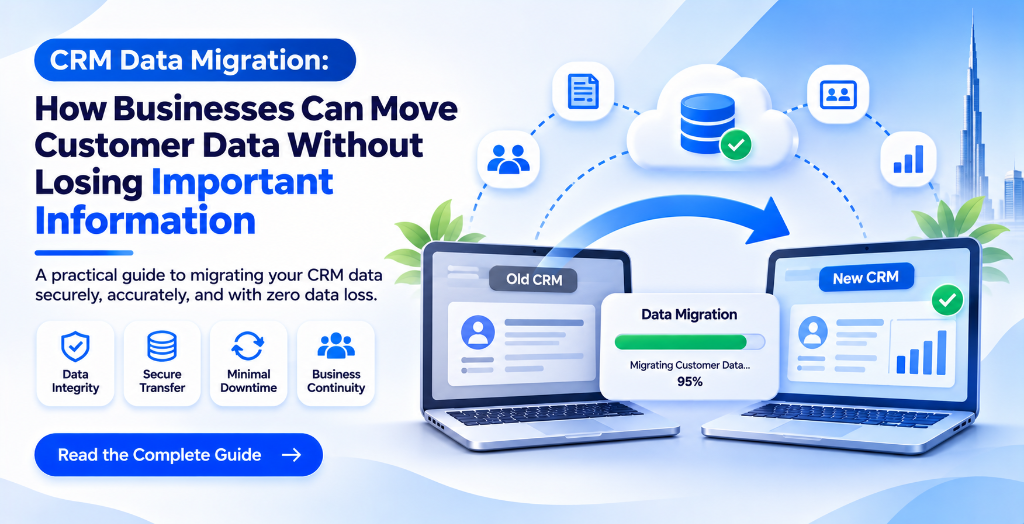
Customer information is one of the most valuable resources for any business. It includes contact details, enquiry records, purchase histories, communication records, sales information, and customer preferences.
As businesses grow, their existing CRM systems may no longer support their requirements. Some companies experience performance issues, while others need additional features, better reporting, or customized workflows.
In such situations, moving to a new CRM platform becomes an important business decision.
However, transferring customer information is not as simple as exporting one file and uploading it somewhere else. Poorly planned migration can result in missing records, duplicate entries, incorrect information, and interruptions to daily business activities.
CRM data migration provides a structured way to move business information from an existing system to a new platform while maintaining data quality and accessibility.
1. Why Businesses Need CRM Data Migration
Businesses may decide to migrate their CRM data for several reasons.
Outdated Software: Older CRM platforms may lack modern features, integrations, and performance capabilities.
Limited Customization: Standard CRM software may not support the specific workflows required by a growing organization.
Increasing Data Volume: As customer records increase, businesses may need better database structures and improved data management.
High Software Costs: Maintaining multiple subscriptions or outdated systems can increase operational expenses.
Better Business Control: Companies may want a customized CRM platform where they have greater control over features, workflows, and reporting.
Migrating to a suitable CRM platform can help businesses improve their customer management processes without losing access to valuable historical information.
2. Common Challenges During CRM Data Migration
A CRM migration project involves several technical and operational challenges.
Understanding these problems before starting the process can help businesses avoid unnecessary complications.
Duplicate Customer Records
Customer information stored across different systems may contain duplicate names, email addresses, or contact numbers.
If these records are transferred without checking, the new CRM may contain repeated customer profiles.
Inconsistent Data Formats
Different CRM platforms may store dates, phone numbers, addresses, and customer details in different formats.
These differences need to be addressed before importing the information.
Missing Customer Information
Some older systems may contain incomplete records or information stored in unsupported fields.
Businesses must identify important missing data before migration.
Integration Compatibility
The new CRM may need to connect with accounting software, websites, payment applications, or other business tools.
The migration process should consider these technical requirements.
Business Downtime
If migration is not properly planned, employees may temporarily lose access to important customer information.
A structured migration plan helps minimize interruptions.
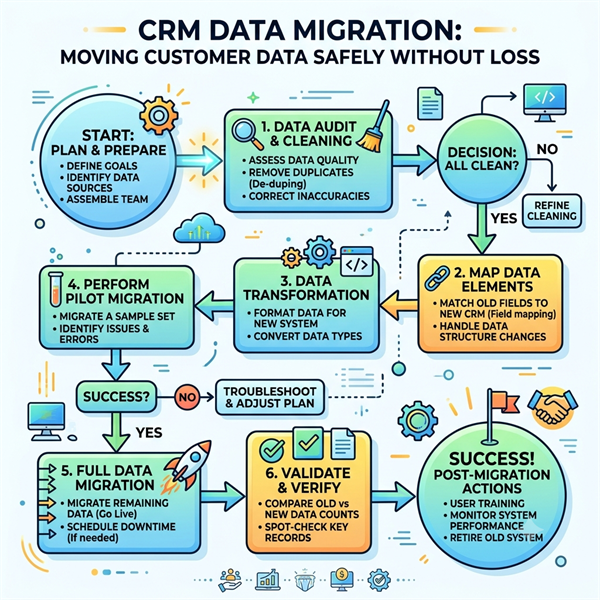
3. Important Steps in a Successful CRM Data Migration Process
A reliable migration project should follow a clear development and implementation process.
Step 1: Analyze the Existing CRM System
The first step is understanding the current CRM environment.
Developers should identify the database structure, available fields, customer records, integrations, and existing workflows.
This analysis helps determine what information needs to be transferred.
Step 2: Clean and Organize Customer Data
Before migration, businesses should review their existing records.
This may involve:
- Removing unnecessary duplicate entries.
- Identifying incomplete customer profiles.
- Correcting inconsistent information.
- Standardizing date and contact formats.
- Separating outdated or irrelevant records.
Clean data makes the new CRM easier to manage.
Step 3: Map Existing Data Fields
Different CRM systems may use different field names and database structures.
For example, one platform may store customer information under the field name Customer Name, while another uses Contact Name.
Developers need to map the existing fields to their corresponding fields in the new system.
Step 4: Develop the Migration Process
Depending on the systems involved, migration may require custom scripts, database queries, APIs, or specialized data transfer tools.
The development team must select a suitable approach that supports the volume and structure of the available information.
Step 5: Test the Migrated Data
Testing helps confirm that the information has been transferred correctly.
Businesses should verify:
- Total customer records transferred.
- Accuracy of contact information.
- Availability of historical records.
- Correct field mapping.
- Data relationships and attachments.
- Functionality of connected applications.
Step 6: Launch the New CRM System
Once testing is completed, the new platform can be introduced into regular business operations.
Employees should receive the necessary training, and technical teams should monitor the system after deployment.
4. Why Data Security Matters During CRM Migration
CRM systems often contain confidential customer and business information.
Therefore, security should remain a priority throughout the migration process.
Businesses should consider the following measures:
Data Backups: Maintain backups of the original database before starting migration.
Access Restrictions: Allow only authorized employees and developers to access sensitive records.
Secure Data Transfer: Use appropriate encryption and secure transfer methods.
Data Validation: Check the transferred information to identify missing or incorrect records.
Audit Logs: Maintain records of important migration activities to improve accountability.
Compliance Requirements: Consider applicable privacy and data protection requirements, including relevant UAE regulations where applicable.
These practices help businesses reduce migration risks and protect important information.
5. When Should Businesses Consider Custom CRM Redevelopment?
Sometimes, migrating data into another standard CRM platform may not solve the actual business problem.
A company may require a completely different database structure, specialized reporting, custom dashboards, or unique operational workflows.
In such situations, custom CRM development may be a better option.
A customized CRM can provide:
- Business-specific customer management features.
- Customized sales and reporting dashboards.
- Advanced employee access management.
- Automated business workflows.
- Integration with existing applications.
- Flexible database structures.
- Scalable architecture for future expansion.
Businesses evaluating the best crm software development services in dubai should consider whether their requirements can be fulfilled through an existing platform or whether a custom-developed solution would provide greater flexibility.
6. How MithilaSoftech Helps Businesses With CRM Development
Choosing the right technology partner can make a significant difference in the success of a CRM migration or redevelopment project.
MithilaSoftech provides software development solutions designed around business requirements.
Our development capabilities include:
- Custom CRM software development.
- Database design and development.
- CRM customization and upgrades.
- Data migration planning and implementation.
- API development and application integration.
- Business workflow automation.
- Web-based application development.
- Software testing and maintenance.
We focus on understanding existing business processes before recommending a suitable development approach.
Whether a company wants to upgrade an existing CRM, migrate customer records, or develop a new customer management platform, MithilaSoftech can help transform its requirements into practical software solutions.
Planning to upgrade your existing CRM system?
Connect with MithilaSoftech to discuss your software development requirements and explore a solution that supports your business operations.
Conclusion
CRM data migration is an important process for businesses planning to upgrade their technology infrastructure or move towards customized software solutions.
Without proper planning, companies may face duplicate records, missing information, compatibility problems, and unnecessary operational disruptions.
A structured migration process involving data analysis, cleaning, field mapping, development, testing, and security checks can help businesses make the transition more effectively.
With the right software development partner, businesses can move beyond outdated systems and build a more flexible customer management environment that supports their future requirements.
Frequently Asked Questions
1. What is CRM data migration?
CRM data migration is the process of transferring customer information, sales records, communication history, and other business data from an existing CRM platform to a new system.
2. Can customer data be transferred from an old CRM to custom-developed software?
Yes. Customer information can be transferred from an existing CRM to custom-developed software using database migration, APIs, custom scripts, and suitable data conversion methods.
3. How can businesses prevent data loss during CRM migration?
Businesses should maintain complete database backups, clean existing records, map data fields correctly, test migrated information, and verify important customer records before launching the new system.
4. Is custom CRM development better than upgrading an existing CRM?
It depends on business requirements. Upgrading an existing CRM may be suitable when the current platform meets most operational needs. Custom development can be more appropriate when businesses require specialized features, workflows, integrations, or greater control over their software.
5. Does CRM migration require technical support?
For complex migrations, technical support is recommended. Developers can handle database structures, data mapping, application compatibility, security, testing, and deployment to reduce the chances of migration-related problems.
← Back to Blogs