

Why Your Business Software Creates More Work Than It Saves
Many business owners invest in software to improve productivity, organize operations, and reduce manual work. However, after implementing multiple tools, they sometimes discover that their employees are spending more time managing software than completing actual business tasks.
Sales teams update customer information in one system, accounting teams maintain separate spreadsheets, and managers prepare reports using data from multiple platforms. Instead of simplifying operations, technology creates additional steps.
The problem is not always the software itself. Often, the real issue is that different systems do not work together or the software does not match the way the business operates. Understanding the cause can help you improve efficiency without rebuilding your entire technology infrastructure.
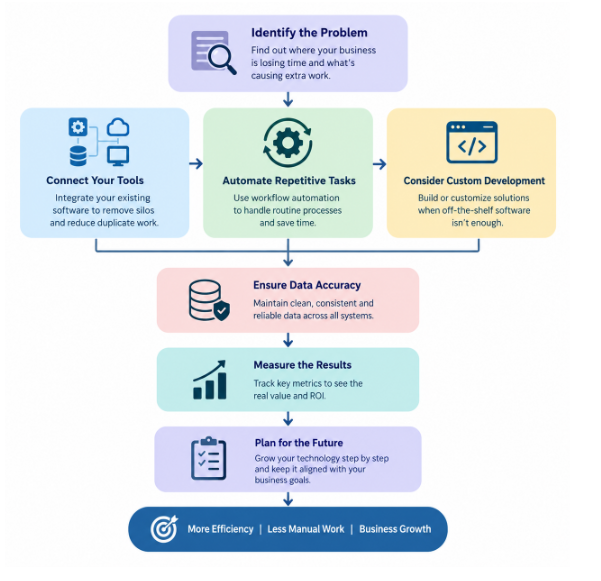
1. Identify Where Your Business Loses Time
Before investing in new software, identify the tasks that repeatedly slow down your team. Common examples include:
- Entering the same customer information into multiple systems.
- Preparing reports manually from different data sources.
- Tracking orders through spreadsheets and email conversations.
- Following up with customers without automated reminders.
- Waiting for approvals because information is scattered across departments.
These problems may appear minor individually, but together they can consume valuable working hours. Practical solution: ask employees to document repetitive tasks for one week. Record how frequently each task occurs, how long it takes, and which tools are involved. This creates a clear picture of where improvements will have the greatest impact.
2. Connect the Software Your Business Already Uses
A company may use accounting software, a customer relationship management system, an inventory platform, and an online store. Each tool may perform its individual function well, but disconnected systems can create unnecessary work. For example, when an online customer places an order, an employee might need to copy the order details into inventory software, notify the accounts team, and update a separate delivery tracker. This increases the likelihood of errors and delays.
Practical solution: explore software integration through APIs, built-in connectors, or middleware. A successful API integration can allow compatible systems to exchange information automatically, reducing duplicate data entry and improving visibility across departments. Before connecting systems, review their compatibility, data quality, security requirements, and integration costs.
3. Replace Repetitive Manual Tasks with Workflow Automation
Not every business problem requires a new application. Sometimes, automating a few repetitive activities can deliver meaningful improvements. Consider a service business that receives dozens of enquiries each week. Employees may manually assign leads, send acknowledgement emails, schedule follow-ups, and update sales records. A workflow automation solution could handle several of these steps automatically. Useful opportunities include:
- Assigning incoming enquiries to the appropriate team member.
- Sending reminders for pending customer follow-ups.
- Generating recurring operational reports.
- Notifying managers when an order or approval requires attention.
- Updating records when a defined business event occurs.
Start with predictable, rule-based tasks and keep human review for decisions that require judgment, exception handling, or sensitive approvals. Our guide to reducing manual data entry errors with business automation covers this in more detail.
4. Know When Off-the-Shelf Software Is No Longer Enough
Ready-made software is often a practical starting point because it offers established features without the cost of building a system from scratch. However, growing businesses may eventually encounter limitations. For example, a distributor may need a special approval process for bulk orders, customer-specific pricing, and real-time stock visibility. If the existing software cannot support these requirements, employees may create manual workarounds that become difficult to maintain as order volumes increase.
Practical solution: compare three options before commissioning a new system:
- Configure the software you already have.
- Integrate it with another suitable application.
- Develop a custom module or application for the specific business requirement.
Custom software development is worth considering when the workflow is important to the business, existing tools cannot accommodate it efficiently, and the expected benefits justify the investment. If your main gap is customer management, also read how to choose the right CRM software for your business.
5. Make Business Data Reliable Before Automating Processes
Automation cannot solve every operational problem if the underlying information is inaccurate or inconsistent. Imagine a business where the same customer appears under different names in several systems. Automated reports may count that customer multiple times, while sales employees may contact the wrong record. Similarly, inaccurate inventory information can cause a business to accept orders for unavailable products.
Practical solution: establish consistent data formats, remove duplicate records, define which system owns each type of information, and assign responsibility for maintaining data quality. When systems exchange information, introduce appropriate validation and error alerts so problems are identified before they affect customers.
6. Calculate Whether a Software Improvement Is Worth the Cost
Evaluate technology investments based on measurable operational results rather than the number of features delivered. Suppose a repetitive process takes 10 hours each week and automation reduces it to 4 hours. The business saves 6 hours per week, which is 300 hours annually over 50 working weeks.
This estimate helps compare the value of the time saved with implementation, licensing, training, and ongoing maintenance costs. Actual financial benefits depend on how the recovered time is used and the total cost of the solution. See also how to reduce software maintenance costs without rebuilding. Track measures such as:
- Time spent completing a task.
- Number of manual errors.
- Order processing time.
- Customer response time.
- Cost per transaction.
- Time required to prepare management reports.
7. Create a Technology Improvement Plan That Grows with Your Business
Replacing every business system at once can be expensive and disruptive. A phased approach makes it easier to manage change and evaluate results. Begin with the operational problem that creates the greatest cost, delay, or customer frustration. Document the current process, define the desired outcome, and identify the smallest practical improvement.
Test the solution with a limited group of users before expanding it across the organization. Provide training, monitor performance, and address issues before introducing additional automation. As the business grows, periodically review whether the existing technology still supports its processes, reporting needs, and customer expectations.
How Mithila Softech Can Help Businesses Solve Development Challenges
Mithila Softech provides web development, custom software solutions in India, application development, and related technology services. These capabilities can support organizations that need to improve existing digital systems, build business-specific functionality, or connect technology with operational requirements.
A useful development project begins with understanding the business problem rather than immediately selecting a technology. By documenting workflows, defining measurable objectives, and evaluating existing systems, businesses can decide whether to configure, integrate, automate, or develop software. The right approach depends on the organization’s processes, budget, technical environment, and long-term plans.
Conclusion
Business software should reduce unnecessary work, improve visibility, and help employees focus on valuable activities. When technology creates additional steps, the solution may be better integration, workflow automation, improved data quality, or carefully targeted custom development. Start by identifying the tasks that waste the most time, measure their impact, and prioritize improvements that solve genuine operational problems.
For businesses evaluating their next technology investment, contact Mithila Softech to turn specific operational challenges into practical digital solutions.
Frequently Asked Questions
1. Why does business software sometimes reduce productivity?
It can reduce productivity when systems are disconnected, employees must enter data repeatedly, workflows are poorly designed, or users lack adequate training. Identifying the source of the extra work is the first step toward an effective solution.
2. How can a business reduce manual data entry?
By integrating compatible applications, using automated data synchronization, standardizing forms, and eliminating unnecessary duplicate records. Data validation should also be implemented to prevent errors from spreading between systems.
3. When should a business invest in custom software development?
When existing products cannot support essential workflows, integrations, reporting requirements, or business-specific rules. Compare development costs and maintenance needs against the expected operational benefits.
4. Is workflow automation suitable for small businesses?
Yes. Small businesses can automate repetitive tasks such as lead assignment, appointment reminders, invoice notifications, and routine reporting. Starting with a simple, frequently repeated task can demonstrate value before expanding automation.
5. How can a business measure the success of a software development project?
By comparing performance before and after implementation: time saved, fewer manual errors, faster order processing, improved customer response times, reduced operating costs, and better data accuracy. Establishing baseline measurements before development makes results easier to evaluate.
← Back to Blogs